Libraries
DANA libraries and testing tools provide merchants with a comprehensive integration solution that streamlines development and ensures quality. Our integrated package eliminates the need to build complex API requests from scratch while providing robust testing capabilities.
The solution handles essential DANA features including authentication, request formatting, and response parsing, with support for multiple programming languages and automated testing scenarios to validate your integration.
Supported programming languages





- NodeJS
- Python
- Go
- PHP
- Java
Library
Simple, efficient, and reliable - Start integrating with DANA APIs in minutes instead of hours.
DANA libraries provide a powerful toolkit that simplifies integration with DANA payment solutions. Built and maintained by our engineering team, these libraries eliminate the complexity of building API integrations from scratch.
Why you should use it
Our library simplifies your integration process by providing:✅ Ready-to-use API client - No need to build API requests from scratch
✅ Built-in authentication handling - Secure API access out of the box
✅ Automatic request formatting - Properly structured API calls every time
✅ Response parsing - Clean, typed responses ready for your code
Requirements
- Node.js version 18 or later
- Your testing credentials from the merchant portal.
Installation
Install using npm or visit our Githubnpm install dana-node@latest --save
Set up the env
PRIVATE_KEY or PRIVATE_KEY_PATH        # Private key string (PRIVATE_KEY) or path to private key file (PRIVATE_KEY_PATH)
ORIGIN                                 # Your application's origin URL
X_PARTNER_ID                           # Client ID provided at onboarding
ENV or DANA_ENV                        # DANA's environment either 'sandbox' or 'production'
CLIENT_SECRET                          # Client Secret provided at onboarding (required for Disbursement API)
Obtaining merchant credentials: Authentication
Mandatory UAT Testing
Thorough testing is critical for ensuring your integration works correctly across all scenarios and edge cases before going live. Our standardized testing package eliminates manual configuration and significantly accelerates your integration process.
What the script does
- Install the latest version of our library from Repo.
- Run a complete suite of predefined test scenarios.
- Display real-time test results in your terminal.
Why you should use it
Simple, automated, and reliable - get your integration tested and validated without manual effort.Our testing package streamlines your integration process by automatically handling installation and testing. Simply clone our test suite, configure your credentials, and run the automated test script, the library will install itself and validate your integration in under 2 minutes.
The automated testing provides:
✅ Automated test scenario checklist for DANA Sandbox.
✅ Auto-installation of the latest library version.
✅ Self-running test scenarios that validate your setup.
✅ Real-time test results in your terminal.
✅ Safe testing environment - No real transactions.
Usage & Installation
Prerequisites
- Node.js version 18 or later
- Your testing credentials from the merchant portal.
Step 1: Clone the Test Package
Clone the test package from the provided link.git clone git@github.com:dana-id/self_testing_scenario.git
cd self_testing_scenario
Step 2: Configure your environment file
Change the .env-example file name to .env and fill in your credentials. Ensure you have obtained these credentials during the onboarding process.MERCHANT_ID=your_merchant_id # Your unique merchant identifier
X_PARTNER_ID=your_partner_id # Partner ID/Client ID provided during onboarding
CHANNEL_ID=your_channel_id # Channel identifier for your integration
PRIVATE_KEY=your_private_key # Your authentication private key string
ORIGIN=your_origin # Your application's origin URL
CLIENT_SECRET=your_client_secret # Client secret provided during onboarding (required for Disbursement solution)
Step 3: Run the Automated Test Script
In your terminal, run this script your preferred programming language. Adjust python to choose the language (go/php/node/java) and adjust payment_gateway to choose the solution (widget/disbursement)sh run-test.sh python payment_gateway
Run this script to list other commands (retrying specific test, running multiple specific test, etc.)
sh [run-test.sh](http://run-test.sh/) help
What You Get After Running the Test
🟢 Clear pass/fail status for each scenario.
🟢 Easy reruns for retesting or regression.
🟢 Testing without any real transaction, safe and isolated.
Mandatory test scenarios
By running the automated test scenario, you can execute all test scenarios simultaneously without having to run them one by one. This saves significant time since the entire test suite completes in just 2 minutes. To see the complete list of test scenarios covered in the automated testing, please refer to the section below.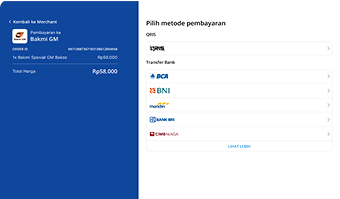
Library
Simple, efficient, and reliable - Start integrating with DANA APIs in minutes instead of hours.
DANA libraries provide a powerful toolkit that simplifies integration with DANA payment solutions. Built and maintained by our engineering team, these libraries eliminate the complexity of building API integrations from scratch.
Why you should use it
Our library simplifies your integration process by providing:✅ Ready-to-use API client - No need to build API requests from scratch
✅ Built-in authentication handling - Secure API access out of the box
✅ Automatic request formatting - Properly structured API calls every time
✅ Response parsing - Clean, typed responses ready for your code
Requirements
- Python 3.9.1+
- Your testing credentials from the merchant portal.
Installation
Install using pip or visit our Githubpip install dana-python
Set up the env
PRIVATE_KEY or PRIVATE_KEY_PATH        # Private key string (PRIVATE_KEY) or path to private key file (PRIVATE_KEY_PATH)
ORIGIN                                 # Your application's origin URL
X_PARTNER_ID                           # Client ID provided at onboarding
ENV or DANA_ENV                        # DANA's environment either 'sandbox' or 'production'
CLIENT_SECRET                          # Client Secret provided at onboarding (required for Disbursement API)
Obtaining merchant credentials: Authentication
Import Package
For example:import dana.payment_gateway.v1
Mandatory UAT Testing
Thorough testing is critical for ensuring your integration works correctly across all scenarios and edge cases before going live. Our standardized testing package eliminates manual configuration and significantly accelerates your integration process.
What the script does
- Install the latest version of our library from Repo.
- Run a complete suite of predefined test scenarios.
- Display real-time test results in your terminal.
Why you should use it
Simple, automated, and reliable - get your integration tested and validated without manual effort.Our testing package streamlines your integration process by automatically handling installation and testing. Simply clone our test suite, configure your credentials, and run the automated test script, the library will install itself and validate your integration in under 2 minutes.
The automated testing provides:
✅ Automated test scenario checklist for DANA Sandbox.
✅ Auto-installation of the latest library version.
✅ Self-running test scenarios that validate your setup.
✅ Real-time test results in your terminal.
✅ Safe testing environment - No real transactions.
Usage & Installation
Prerequisites
- Python 3.9.1+
- Your testing credentials from the merchant portal.
Step 1: Clone the Test Package
Clone the test package from the provided link.git clone git@github.com:dana-id/self_testing_scenario.git
cd self_testing_scenario
Step 2: Configure your environment file
Change the .env-example file name to .env and fill in your credentials. Ensure you have obtained these credentials during the onboarding process.MERCHANT_ID=your_merchant_id # Your unique merchant identifier
X_PARTNER_ID=your_partner_id # Partner ID/Client ID provided during onboarding
CHANNEL_ID=your_channel_id # Channel identifier for your integration
PRIVATE_KEY=your_private_key # Your authentication private key string
ORIGIN=your_origin # Your application's origin URL
CLIENT_SECRET=your_client_secret # Client secret provided during onboarding (required for Disbursement solution)
Step 3: Run the Automated Test Script
In your terminal, run this script your preferred programming language. Adjust python to choose the language (go/php/node/java) and adjust payment_gateway to choose the solution (widget/disbursement)sh run-test.sh python payment_gateway
Run this script to list other commands (retrying specific test, running multiple specific test, etc.)
sh [run-test.sh](http://run-test.sh/) help
What You Get After Running the Test
🟢 Clear pass/fail status for each scenario.
🟢 Easy reruns for retesting or regression.
🟢 Testing without any real transaction, safe and isolated.
Mandatory test scenarios
By running the automated test scenario, you can execute all test scenarios simultaneously without having to run them one by one. This saves significant time since the entire test suite completes in just 2 minutes. To see the complete list of test scenarios covered in the automated testing, please refer to the section below.Library
Simple, efficient, and reliable - Start integrating with DANA APIs in minutes instead of hours.
DANA libraries provide a powerful toolkit that simplifies integration with DANA payment solutions. Built and maintained by our engineering team, these libraries eliminate the complexity of building API integrations from scratch.
Why you should use it
Our library simplifies your integration process by providing:✅ Ready-to-use API client - No need to build API requests from scratch
✅ Built-in authentication handling - Secure API access out of the box
✅ Automatic request formatting - Properly structured API calls every time
✅ Response parsing - Clean, typed responses ready for your code
Requirements
- go.mod
- go.sum file
- Your testing credentials from the merchant portal.
Installation
Install or visit our Githubgo get github.com/dana-id/dana-go/v2
Set up the env
PRIVATE_KEY or PRIVATE_KEY_PATH        # Private key string (PRIVATE_KEY) or path to private key file (PRIVATE_KEY_PATH)
ORIGIN                                 # Your application's origin URL
X_PARTNER_ID                           # Client ID provided at onboarding
ENV or DANA_ENV                        # DANA's environment either 'sandbox' or 'production'
CLIENT_SECRET                          # Client Secret provided at onboarding (required for Disbursement API)
Obtaining merchant credentials: Authentication
Import Package
For example:import (
payment_gateway "github.com/dana-id/dana-go/payment_gateway/v1"
)
Mandatory UAT Testing
Thorough testing is critical for ensuring your integration works correctly across all scenarios and edge cases before going live. Our standardized testing package eliminates manual configuration and significantly accelerates your integration process.
What the script does
- Install the latest version of our library from Repo.
- Run a complete suite of predefined test scenarios.
- Display real-time test results in your terminal.
Why you should use it
Simple, automated, and reliable - get your integration tested and validated without manual effort.Our testing package streamlines your integration process by automatically handling installation and testing. Simply clone our test suite, configure your credentials, and run the automated test script, the library will install itself and validate your integration in under 2 minutes.
The automated testing provides:
✅ Automated test scenario checklist for DANA Sandbox.
✅ Auto-installation of the latest library version.
✅ Self-running test scenarios that validate your setup.
✅ Real-time test results in your terminal.
✅ Safe testing environment - No real transactions.
Usage & Installation
Prerequisites
- go.mod
- go.sum file
- Your testing credentials from the merchant portal.
Step 1: Clone the Test Package
Clone the test package from the provided link.git clone git@github.com:dana-id/self_testing_scenario.git
cd self_testing_scenario
Step 2: Configure your environment file
Change the .env-example file name to .env and fill in your credentials. Ensure you have obtained these credentials during the onboarding process.MERCHANT_ID=your_merchant_id # Your unique merchant identifier
X_PARTNER_ID=your_partner_id # Partner ID/Client ID provided during onboarding
CHANNEL_ID=your_channel_id # Channel identifier for your integration
PRIVATE_KEY=your_private_key # Your authentication private key string
ORIGIN=your_origin # Your application's origin URL
CLIENT_SECRET=your_client_secret # Client secret provided during onboarding (required for Disbursement solution)
Step 3: Run the Automated Test Script
In your terminal, run this script your preferred programming language. Adjust python to choose the language (go/php/node/java) and adjust payment_gateway to choose the solution (widget/disbursement)sh run-test.sh python payment_gateway
Run this script to list other commands (retrying specific test, running multiple specific test, etc.)
sh [run-test.sh](http://run-test.sh/) help
What You Get After Running the Test
🟢 Clear pass/fail status for each scenario.
🟢 Easy reruns for retesting or regression.
🟢 Testing without any real transaction, safe and isolated.
Mandatory test scenarios
By running the automated test scenario, you can execute all test scenarios simultaneously without having to run them one by one. This saves significant time since the entire test suite completes in just 2 minutes. To see the complete list of test scenarios covered in the automated testing, please refer to the section below.Library
Simple, efficient, and reliable - Start integrating with DANA APIs in minutes instead of hours.
DANA libraries provide a powerful toolkit that simplifies integration with DANA payment solutions. Built and maintained by our engineering team, these libraries eliminate the complexity of building API integrations from scratch.
Why you should use it
Our library simplifies your integration process by providing:✅ Ready-to-use API client - No need to build API requests from scratch
✅ Built-in authentication handling - Secure API access out of the box
✅ Automatic request formatting - Properly structured API calls every time
✅ Response parsing - Clean, typed responses ready for your code
Requirements
- PHP 7.4+, compatible with PHP 8.0.
- Your testing credentials from the merchant portal.
Installation
Install using composer or visit our Github- Using Composer
- Add the following code to
composer.json
- Add the following code to
{
  "repositories": [
    {
      "type": "vcs",
      "url": "https://github.com/dana-id/dana-php.git"
    }
  ],
  "require": {
    "danaid/dana-php": "^2.0"
  }
}
- Run
composer install
- Manual Installation
<?php
require_once('/path/to/DanaPhp/vendor/autoload.php');
Set up the env
PRIVATE_KEY or PRIVATE_KEY_PATH        # Private key string (PRIVATE_KEY) or path to private key file (PRIVATE_KEY_PATH)
ORIGIN                                 # Your application's origin URL
X_PARTNER_ID                           # Client ID provided at onboarding
ENV or DANA_ENV                        # DANA's environment either 'sandbox' or 'production'
CLIENT_SECRET                          # Client Secret provided at onboarding (required for Disbursement API)
Obtaining merchant credentials: Authentication
Import Package
For example:use Dana\PaymentGateway\v1
Mandatory UAT Testing
Thorough testing is critical for ensuring your integration works correctly across all scenarios and edge cases before going live. Our standardized testing package eliminates manual configuration and significantly accelerates your integration process.
What the script does
- Install the latest version of our library from Repo.
- Run a complete suite of predefined test scenarios.
- Display real-time test results in your terminal.
Why you should use it
Simple, automated, and reliable - get your integration tested and validated without manual effort.Our testing package streamlines your integration process by automatically handling installation and testing. Simply clone our test suite, configure your credentials, and run the automated test script, the library will install itself and validate your integration in under 2 minutes.
The automated testing provides:
✅ Automated test scenario checklist for DANA Sandbox.
✅ Auto-installation of the latest library version.
✅ Self-running test scenarios that validate your setup.
✅ Real-time test results in your terminal.
✅ Safe testing environment - No real transactions.
Usage & Installation
Prerequisites
- PHP 7.4+, compatible with PHP 8.0.
- Your testing credentials from the merchant portal.
Step 1: Clone the Test Package
Clone the test package from the provided link.git clone git@github.com:dana-id/self_testing_scenario.git
cd self_testing_scenario
Step 2: Configure your environment file
Change the .env-example file name to .env and fill in your credentials. Ensure you have obtained these credentials during the onboarding process.MERCHANT_ID=your_merchant_id # Your unique merchant identifier
X_PARTNER_ID=your_partner_id # Partner ID/Client ID provided during onboarding
CHANNEL_ID=your_channel_id # Channel identifier for your integration
PRIVATE_KEY=your_private_key # Your authentication private key string
ORIGIN=your_origin # Your application's origin URL
CLIENT_SECRET=your_client_secret # Client secret provided during onboarding (required for Disbursement solution)
Step 3: Run the Automated Test Script
In your terminal, run this script your preferred programming language. Adjust python to choose the language (go/php/node/java) and adjust payment_gateway to choose the solution (widget/disbursement)sh run-test.sh python payment_gateway
Run this script to list other commands (retrying specific test, running multiple specific test, etc.)
sh [run-test.sh](http://run-test.sh/) help
What You Get After Running the Test
🟢 Clear pass/fail status for each scenario.
🟢 Easy reruns for retesting or regression.
🟢 Testing without any real transaction, safe and isolated.
Mandatory test scenarios
By running the automated test scenario, you can execute all test scenarios simultaneously without having to run them one by one. This saves significant time since the entire test suite completes in just 2 minutes. To see the complete list of test scenarios covered in the automated testing, please refer to the section below.Library
Simple, efficient, and reliable - Start integrating with DANA APIs in minutes instead of hours.
DANA libraries provide a powerful toolkit that simplifies integration with DANA payment solutions. Built and maintained by our engineering team, these libraries eliminate the complexity of building API integrations from scratch.
Why you should use it
Our library simplifies your integration process by providing:✅ Ready-to-use API client - No need to build API requests from scratch
✅ Built-in authentication handling - Secure API access out of the box
✅ Automatic request formatting - Properly structured API calls every time
✅ Response parsing - Clean, typed responses ready for your code
Requirements
- JDK 1.8 or later.
- Your testing credentials from the merchant portal.
Installation
Install using maven or visit our GithubInstall the API Library using maven
- Add the following dependency to your
pom.xml
<dependency>
    <groupId>id.dana</groupId>
    <artifactId>dana-java</artifactId>
    <version>2.1.6</version>
</dependency>
- run
mvn clean install
Set up the env
PRIVATE_KEY or PRIVATE_KEY_PATH        # Private key string (PRIVATE_KEY) or path to private key file (PRIVATE_KEY_PATH)
ORIGIN                                 # Your application's origin URL
X_PARTNER_ID                           # Client ID provided at onboarding
ENV or DANA_ENV                        # DANA's environment either 'sandbox' or 'production'
CLIENT_SECRET                          # Client Secret provided at onboarding (required for Disbursement API)
Obtaining merchant credentials: Authentication
Import Package
For example:import id.dana.invoker.Dana;
import id.dana.paymentgateway.v1.api.PaymentGatewayApi;
Mandatory UAT Testing
Thorough testing is critical for ensuring your integration works correctly across all scenarios and edge cases before going live. Our standardized testing package eliminates manual configuration and significantly accelerates your integration process.
What the script does
- Install the latest version of our library from Repo.
- Run a complete suite of predefined test scenarios.
- Display real-time test results in your terminal.
Why you should use it
Simple, automated, and reliable - get your integration tested and validated without manual effort.Our testing package streamlines your integration process by automatically handling installation and testing. Simply clone our test suite, configure your credentials, and run the automated test script, the library will install itself and validate your integration in under 2 minutes.
The automated testing provides:
✅ Automated test scenario checklist for DANA Sandbox.
✅ Auto-installation of the latest library version.
✅ Self-running test scenarios that validate your setup.
✅ Real-time test results in your terminal.
✅ Safe testing environment - No real transactions.
Usage & Installation
Prerequisites
- JDK 1.8 or later.
- Your testing credentials from the merchant portal.
Step 1: Clone the Test Package
Clone the test package from the provided link.git clone git@github.com:dana-id/self_testing_scenario.git
cd self_testing_scenario
Step 2: Configure your environment file
Change the .env-example file name to .env and fill in your credentials. Ensure you have obtained these credentials during the onboarding process.MERCHANT_ID=your_merchant_id # Your unique merchant identifier
X_PARTNER_ID=your_partner_id # Partner ID/Client ID provided during onboarding
CHANNEL_ID=your_channel_id # Channel identifier for your integration
PRIVATE_KEY=your_private_key # Your authentication private key string
ORIGIN=your_origin # Your application's origin URL
CLIENT_SECRET=your_client_secret # Client secret provided during onboarding (required for Disbursement solution)
Step 3: Run the Automated Test Script
In your terminal, run this script your preferred programming language. Adjust python to choose the language (go/php/node/java) and adjust payment_gateway to choose the solution (widget/disbursement)sh run-test.sh python payment_gateway
Run this script to list other commands (retrying specific test, running multiple specific test, etc.)
sh [run-test.sh](http://run-test.sh/) help
What You Get After Running the Test
🟢 Clear pass/fail status for each scenario.
🟢 Easy reruns for retesting or regression.
🟢 Testing without any real transaction, safe and isolated.
Mandatory test scenarios
By running the automated test scenario, you can execute all test scenarios simultaneously without having to run them one by one. This saves significant time since the entire test suite completes in just 2 minutes. To see the complete list of test scenarios covered in the automated testing, please refer to the section below.
